Index Analysis
The Index Analysis dashboard helps you prioritize index optimization work by identifying high-value missing index opportunities and surfacing existing indexes that may be hurting performance. This dashboard analyzes index usage patterns to guide decisions about which indexes to create, which to remove, and which to consolidate, helping you balance query performance improvements against the costs of index maintenance and storage.
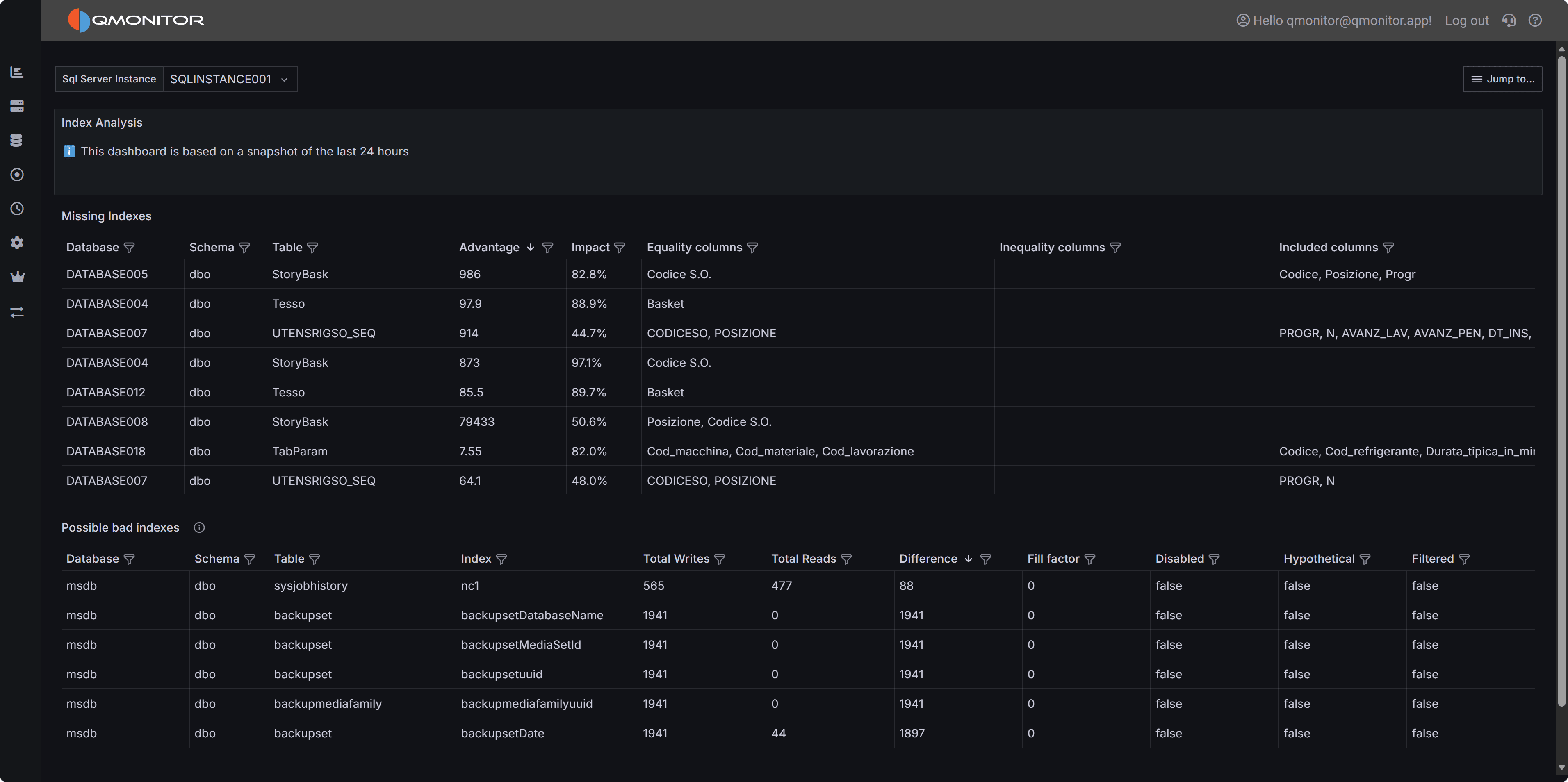 Index Analysis dashboard showing missing index recommendations and underutilized existing indexes
Note
This dashboard is based on a snapshot of the last 24 hours of activity. Index usage patterns may vary over longer periods, so consider analyzing data across different time windows (weekdays vs. weekends, month-end processing, etc.) before making index decisions.Dashboard Sections
Missing Indexes
The Missing Indexes section displays optimizer-suggested indexes that could improve query performance. SQL Server’s query optimizer tracks situations where an index would have been beneficial during query execution, and this dashboard surfaces those recommendations prioritized by potential impact.
The table includes the following columns to help you evaluate each missing index suggestion:
- Database identifies which database would benefit from the index.
- Schema shows the schema name containing the table.
- Table displays the table name that needs the index.
- Advantage provides an estimate of the expected improvement, typically measured in reduced logical reads or improved query execution time.
- Impact shows a percentage representing the relative benefit of this index across the entire workload. Higher impact values indicate indexes that would benefit more queries or more frequently-executed queries.
- Equality columns lists columns recommended for equality predicates (WHERE column = value). These become the key columns of the index and should appear first in the index definition.
- Inequality columns lists columns recommended for range predicates (WHERE column > value, BETWEEN, etc.). These should appear after equality columns in the key.
- Included columns lists non-key columns suggested for covering queries. Including these columns allows queries to satisfy all their column needs from the index without looking up data in the base table.
Sort by Impact to find the highest-value missing indexes that would benefit the most queries. Sort by Advantage to identify indexes that would provide the greatest improvement to individual query performance. Filter by Database or Table to focus optimization efforts on specific areas.
Important
Missing index recommendations are heuristic estimates, not guarantees. Always validate suggestions by testing in a non-production environment, reviewing execution plans before and after index creation, and considering the write overhead and storage costs of new indexes. Not all suggested indexes should be created.Evaluating Missing Index Recommendations
When considering whether to create a suggested index:
Assess the Impact: High-impact suggestions (above 80%) typically represent significant optimization opportunities affecting many queries or critical workloads. Lower-impact suggestions may not justify the overhead.
Review the Column Lists: Equality columns, inequality columns, and included columns together define the complete index structure. Ensure the suggested column order makes sense for your queries. Sometimes reordering columns or creating multiple smaller indexes is more effective than the exact suggested structure.
Consider Write Overhead: Every index must be maintained during INSERT, UPDATE, and DELETE operations. Tables with heavy write workloads may not benefit from additional indexes despite optimizer suggestions. Balance read performance improvements against write performance costs.
Check for Overlapping Indexes: Before creating a new index, review existing indexes on the same table. You may be able to modify an existing index to cover the missing index scenario rather than creating an entirely new index. Consolidating indexes reduces storage and maintenance overhead.
Validate with Actual Queries: Identify the specific queries that would benefit from the suggested index using the Query Stats dashboard. Test those queries with the proposed index to verify the performance improvement matches expectations. Sometimes query optimization or statistics updates are more effective than adding indexes.
Evaluate Storage Impact: Large indexes on large tables consume significant storage and memory. Ensure you have capacity for the new index and that it won’t negatively impact buffer pool efficiency by consuming memory needed for data pages.
Possible Bad Indexes
The Possible Bad Indexes section identifies existing indexes that may be candidates for removal or consolidation because they incur maintenance overhead without providing sufficient query performance benefits. These indexes consume storage, slow down write operations, and use buffer pool memory that could be better utilized elsewhere.
The table displays the following information:
- Database shows which database contains the index.
- Schema displays the schema name.
- Table shows the table containing the index.
- Index displays the index name.
- Total Writes shows the cumulative number of write operations (inserts, updates, deletes) that affected this index during the analysis period. High write counts indicate significant maintenance overhead.
- Total Reads displays the cumulative number of read operations (seeks, scans, lookups) that used this index. Low read counts suggest the index isn’t providing much query benefit.
- Difference shows Total Writes minus Total Reads. Large positive values indicate write-heavy indexes with minimal read usage—strong candidates for removal.
- Fill factor displays the configured fill factor percentage. Lower values (like 70-80%) leave space for inserts but consume more storage and may indicate fragmentation concerns.
- Disabled indicates whether the index is currently disabled. Disabled indexes still consume storage but aren’t used by queries—they should generally be removed unless temporarily disabled for maintenance.
- Hypothetical shows whether the index is hypothetical (created with STATISTICS_ONLY). Hypothetical indexes are usually remnants of tools like Database Engine Tuning Advisor and should be removed if not
- actively used for testing.
- Filtered indicates whether the index uses a filter predicate (WHERE clause). Filtered indexes apply to a subset of rows and may have different usage patterns than full-table indexes.
Sort by Difference to find indexes with the highest write-to-read ratio. Filter by Disabled = true to find indexes that should be removed immediately. Filter by Total Reads = 0 to find completely unused indexes.
Warning
Never drop indexes in production without thorough testing. Even indexes that appear unused may be critical for specific queries, maintenance operations, or periodic workloads not captured in the 24-hour analysis window. Always test index removal in non-production environments first.Investigating Underutilized Indexes
When evaluating whether to remove or consolidate an index:
Analyze Usage Patterns Over Time: The dashboard shows 24-hour activity, but some indexes support monthly reporting, quarterly processes, or annual operations. Analyze index usage over longer periods before dropping indexes that appear unused.
Check for Foreign Key Relationships: Indexes supporting foreign key constraints are often critical for delete operations and join performance even if they show low read counts. Verify whether the index supports a foreign key before considering removal.
Review Unique and Primary Key Constraints: Indexes enforcing uniqueness or primary key constraints cannot be dropped without removing the constraint. These indexes serve data integrity purposes beyond query optimization.
Consider Index Consolidation: Instead of dropping an index entirely, consider whether it could be modified or merged with another index to reduce the total index count while preserving query performance. For example, an index on (Column1, Column2) can often replace separate indexes on (Column1) and (Column2).
Evaluate Filtered Index Opportunities: Write-heavy indexes with low read counts might be better implemented as filtered indexes covering only the rows frequently queried. This reduces write overhead while maintaining query performance for the important subset of data.
Test in Non-Production: Create a test environment, drop the candidate index, and run representative workloads. Monitor query performance and execution plans to verify no queries are negatively impacted. Pay special attention to batch processes, reports, and administrative operations.
Using the Dashboard Effectively
Regular Review: Analyze index recommendations monthly or quarterly to identify new optimization opportunities as workloads evolve. Index needs change over time as data volumes grow and query patterns shift.
Prioritize High-Impact Work: Focus first on missing indexes with impact above 80% and existing indexes with Difference (writes - reads) above 10,000. These represent the clearest optimization opportunities with the most significant potential benefit.
Balance Read and Write Performance: Creating indexes improves read performance but degrades write performance. For write-heavy tables, be more conservative about adding indexes. For read-heavy tables, missing index recommendations are more likely to provide net benefit.
Cross-Reference with Query Stats: Use the Query Stats dashboard to identify which specific queries would benefit from suggested indexes or are affected by index removal. This provides concrete data to validate index decisions rather than relying solely on estimates.
Document Decisions: When creating or dropping indexes based on this dashboard, document the reasoning, expected impact, and actual results. This helps track whether index changes deliver expected benefits and guides future optimization work.
Consider Maintenance Windows: Creating large indexes can be resource-intensive and may impact production workloads. Schedule index creation during maintenance windows using the ONLINE option where available to minimize disruption.
Best Practice
Index Optimization Workflow:
- Identify high-impact missing indexes
- Test in non-production
- Measure query performance improvements
- Create in production during maintenance windows
- Monitor write performance impact
- Periodically review for underutilized indexes.